

Computer Controls
Control the computer's mouse, keyboard, and screen
Use OS-level controls to move and click the mouse, type and press keys, scroll, drag, and capture screenshots from a running browser session. Both moveMouse and dragMouse use human-like Bézier curves by default.
Click the mouse
Simulate mouse clicks at specific coordinates. You can select the button, click type (down, up, click), number of clicks, and optional modifier keys to hold.
import Kernel from '@onkernel/sdk';

const kernel = new Kernel();
const kernelBrowser = await kernel.browsers.create();

// Basic left click at (100, 200)
await kernel.browsers.computer.clickMouse(kernelBrowser.session_id, {
  x: 100,
  y: 200,
});

// Double right-click while holding Shift
await kernel.browsers.computer.clickMouse(kernelBrowser.session_id, {
  x: 100,
  y: 200,
  button: 'right',
  click_type: 'click',
  num_clicks: 2,
  hold_keys: ['Shift'],
});
Move the mouse
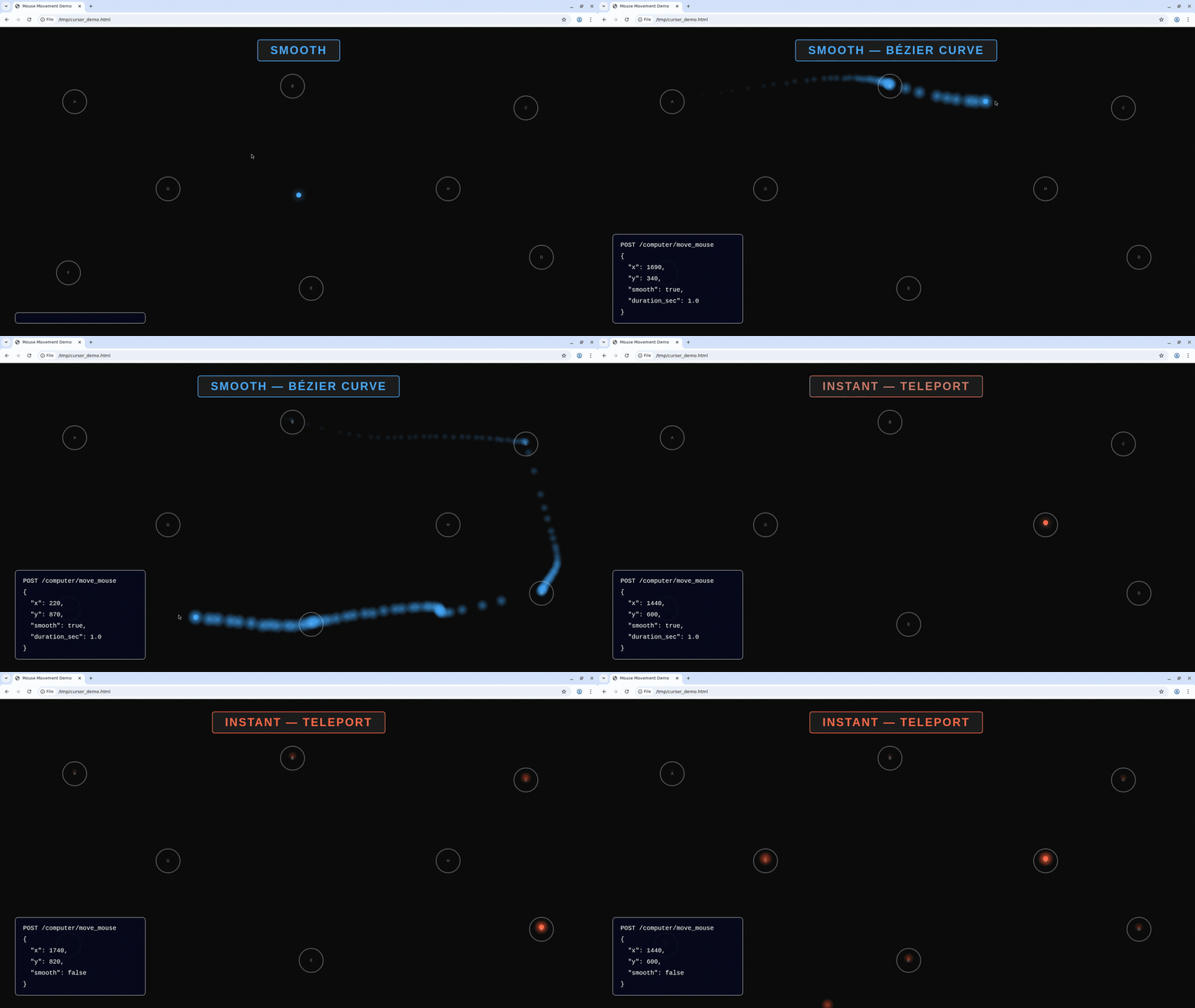
Move the cursor to specific screen coordinates. By default, the cursor follows a human-like Bezier curve path instead of teleporting instantly. You can control this with smooth and duration_ms.
| Parameter | Type | Default | Description |
|---|---|---|---|
x | integer | — | X coordinate to move the cursor to |
y | integer | — | Y coordinate to move the cursor to |
smooth | boolean | true | Use human-like Bezier curve path instead of instant teleport |
duration_ms | integer | auto | Target duration in milliseconds for smooth movement (50–5000). Omit for automatic timing based on distance |
hold_keys | array | — | Modifier keys to hold during the move |
import Kernel from '@onkernel/sdk';

const kernel = new Kernel();
const kernelBrowser = await kernel.browsers.create();

// Human-like smooth movement (default)
await kernel.browsers.computer.moveMouse(kernelBrowser.session_id, {
  x: 500,
  y: 300,
});

// Smooth movement with custom duration
await kernel.browsers.computer.moveMouse(kernelBrowser.session_id, {
  x: 800,
  y: 600,
  smooth: true,
  duration_ms: 1500,
});

// Instant teleport (disable smooth)
await kernel.browsers.computer.moveMouse(kernelBrowser.session_id, {
  x: 100,
  y: 200,
  smooth: false,
});
Smooth vs instant movement
Take screenshots
Capture a full-screen PNG or a specific region.
For WebGL and other animation-heavy pages, captureScreenshot is noticeably faster than CDP's Page.captureScreenshot. If you're driving a computer-use loop off screenshots, prefer computer controls. GPU acceleration gives an additional small speedup for computer controls screenshots, but does not speed up CDP screenshots.
import fs from 'fs';
import { Buffer } from 'buffer';
import Kernel from '@onkernel/sdk';

const kernel = new Kernel();
const kernelBrowser = await kernel.browsers.create();

// Full screenshot
{
  const response = await kernel.browsers.computer.captureScreenshot(kernelBrowser.session_id);
  const blob = await response.blob();
  const buffer = Buffer.from(await blob.arrayBuffer());
  fs.writeFileSync('screenshot.png', buffer);
}

// Region screenshot
{
  const response = await kernel.browsers.computer.captureScreenshot(kernelBrowser.session_id, {
    region: { x: 0, y: 0, width: 800, height: 600 },
  });
  const blob = await response.blob();
  const buffer = Buffer.from(await blob.arrayBuffer());
  fs.writeFileSync('region.png', buffer);
}
Type text
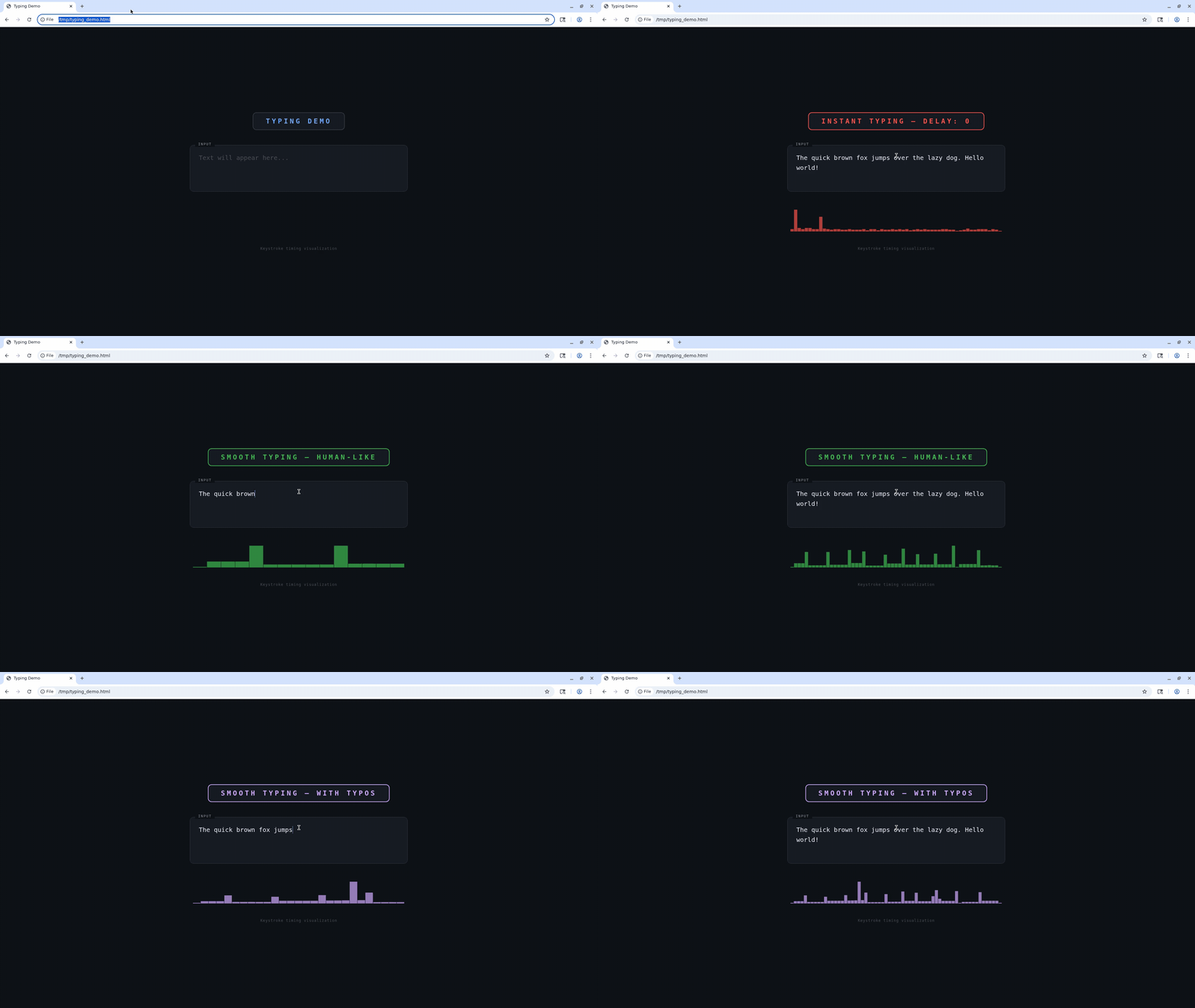
Type literal text on the host. By default, typing uses human-like variable timing: word-sized chunks, natural pauses at word and sentence boundaries, and optional realistic typos corrected with backspace. Set smooth: false for xdotool typing with a fixed per-keystroke delay (delay, in ms) or instant input when delay is 0.
| Parameter | Type | Default | Description |
|---|---|---|---|
text | string | — | Text to type |
delay | integer | 0 | Fixed delay in milliseconds between keystrokes. Only used when smooth is false; ignored when smooth is true |
smooth | boolean | true | Human-like variable keystroke timing with word-boundary pauses (default, same idea as moveMouse / dragMouse) |
typo_chance | number | 0 | Per-character typo rate from 0–0.10 (capped; 0.10 ≈ 10% per character on average), corrected with backspace. Only applies when smooth is true (silently ignored when smooth is false). Typical values are 0.02–0.05 |
import Kernel from '@onkernel/sdk';

const kernel = new Kernel();
const kernelBrowser = await kernel.browsers.create();

// Human-like smooth typing (default — omit smooth or pass true)
await kernel.browsers.computer.typeText(kernelBrowser.session_id, {
  text: 'The quick brown fox jumps over the lazy dog.',
});

// Human-like with occasional typos (3% chance per character)
await kernel.browsers.computer.typeText(kernelBrowser.session_id, {
  text: 'The quick brown fox jumps over the lazy dog.',
  typo_chance: 0.03,
});

// Instant typing (all at once, no per-key delay)
await kernel.browsers.computer.typeText(kernelBrowser.session_id, {
  text: 'Hello, World!',
  smooth: false,
});

// Fixed delay between keystrokes (smooth off)
await kernel.browsers.computer.typeText(kernelBrowser.session_id, {
  text: 'Slow typing...',
  smooth: false,
  delay: 100,
});
Smooth vs instant typing
Press keys
Press one or more key symbols (including combinations like "Ctrl+t" or "Ctrl+Shift+Tab"). Optionally hold modifiers and/or set a duration to hold keys down.
import Kernel from '@onkernel/sdk';

const kernel = new Kernel();
const kernelBrowser = await kernel.browsers.create();

// Tap a key combination
await kernel.browsers.computer.pressKey(kernelBrowser.session_id, {
  keys: ['Ctrl+t'],
});

// Hold keys for 250ms while also holding Alt
await kernel.browsers.computer.pressKey(kernelBrowser.session_id, {
  keys: ['Ctrl+Shift+Tab'],
  duration: 250,
  hold_keys: ['Alt'],
});
Scroll
Scroll the mouse wheel at a specific position. Positive delta_y scrolls down; negative scrolls up. Positive delta_x scrolls right; negative scrolls left. Scroll amounts refer to "wheel units."
import Kernel from '@onkernel/sdk';

const kernel = new Kernel();
const kernelBrowser = await kernel.browsers.create();

await kernel.browsers.computer.scroll(kernelBrowser.session_id, {
  x: 300,
  y: 400,
  delta_x: 0,
  delta_y: 120,
});
Drag the mouse
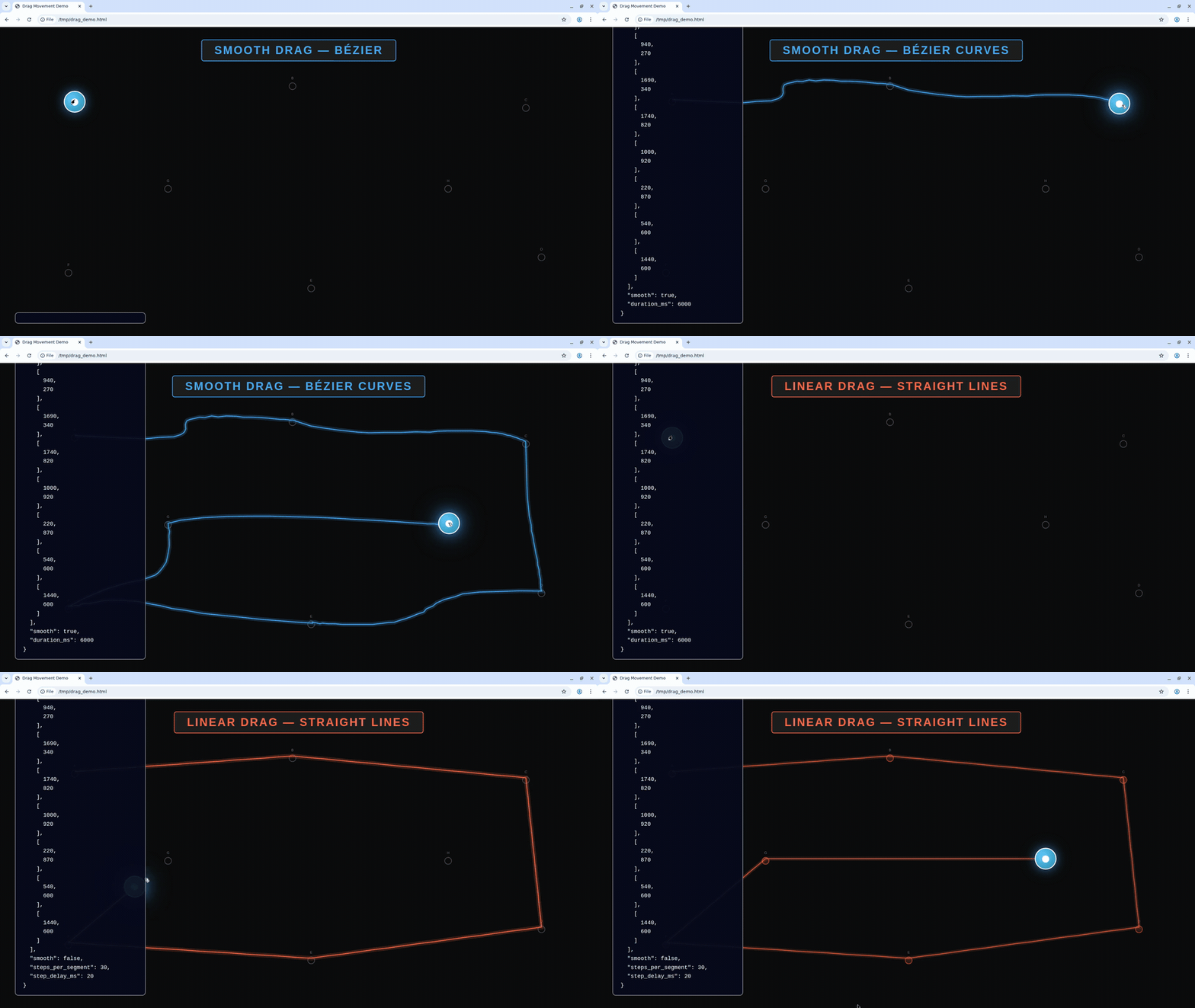
Drag by pressing a button, moving along a path of points, then releasing. By default, drag movement uses human-like Bezier curves between waypoints. Set smooth: false to use linear interpolation with steps_per_segment and step_delay_ms instead.
| Parameter | Type | Default | Description |
|---|---|---|---|
path | array | — | Ordered list of [x, y] coordinate pairs to move through (minimum 2 points) |
button | string | left | Mouse button: left, middle, or right |
smooth | boolean | true | Use human-like Bezier curves between waypoints. When true, steps_per_segment and step_delay_ms are ignored |
duration_ms | integer | auto | Target duration in milliseconds for the entire drag when smooth=true (50–10000). Omit for automatic timing based on total path length |
delay | integer | 0 | Delay in milliseconds between button down and starting to move |
steps_per_segment | integer | 10 | Number of interpolation steps per path segment (only when smooth=false) |
step_delay_ms | integer | 50 | Delay in milliseconds between steps (only when smooth=false) |
hold_keys | array | — | Modifier keys to hold during the drag |
Smooth vs linear drag
import Kernel from '@onkernel/sdk';

const kernel = new Kernel();
const kernelBrowser = await kernel.browsers.create();

// Human-like smooth drag (default)
await kernel.browsers.computer.dragMouse(kernelBrowser.session_id, {
  path: [
    [100, 200],
    [400, 350],
    [700, 200],
  ],
});

// Smooth drag with custom duration
await kernel.browsers.computer.dragMouse(kernelBrowser.session_id, {
  path: [
    [100, 200],
    [400, 350],
    [700, 200],
  ],
  smooth: true,
  duration_ms: 2000,
});

// Linear interpolation drag (legacy behavior)
await kernel.browsers.computer.dragMouse(kernelBrowser.session_id, {
  path: [
    [100, 200],
    [400, 350],
    [700, 200],
  ],
  smooth: false,
  steps_per_segment: 10,
  step_delay_ms: 50,
});